
Disable and Re-Enable your LÔC8Updated 2 months ago
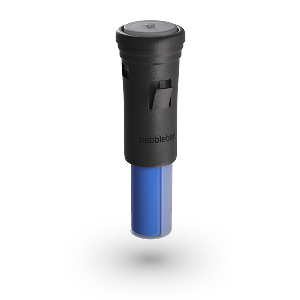
Disable Your LÔC8
Disabling your LÔC8 temporarily stops it from sharing its location.
How to Disable
Locate the button on the top lid of the device.
Double-press the button.
Press again and hold for about 10 seconds until you hear 2 beeps.
Release the button before the second beep ends.
An audible confirmation will sound.
If you do not hear the confirmation sound, repeat steps 2 and 3.
Once disabled, your LOC8 will stop sharing its location.
Re-Enable Your LOC8
If your device has been disabled, it will no longer synchronize its location. Re-enabling is quick and simple.
How to Re-Enable
Locate the button on the top lid of the device.
Single-press the button.
Wait for the audible confirmation sound.
Your LOC8 will resume sharing its location.
Get the Serial Number Identifier
You can retrieve your LOC8 serial number directly from the device.
Enable Serial Number Lookup
Locate the button on the top lid of the device.
Press the button 3 times.
The unit will light up and beep.
Tap your phone to read the serial number.
This makes it easy to identify your device when needed.
You're All Set
With these steps, you can confidently reset, disable, re-enable, or identify your LOC8 whenever needed. Simple controls, clear confirmations — so you always stay in control of your tracking experience.